> ## Documentation Index
> Fetch the complete documentation index at: https://docs.mezmo.com/llms.txt
> Use this file to discover all available pages before exploring further.
# Generate Service and Ingestion Keys
> Create and manage Mezmo ingestion keys and IAM access keys (personal, service, and enterprise), with security best practices for handling tokens.
Generation 1 service keys are being deprecated in favor of Generation 2 IAM access keys. Gen 2 access keys can clearly be identified by its well known prefix format.
Support for generation 1 Service keys will be removed January 31, 2026.
You use personalized, private service and ingestion keys associated with your account to connect Mezmo to third-party applications and services. They enable users, and programs such as log collectors to authenticate with Mezmo without requiring you to share your account details.
Anyone who has access to your service and ingestion keys can send or retrieve logs to or from your account with no additional authentication. Be sure to keep your API keys secret.
### Security Best Practices
* Rotate tokens regularly. Use expirations and rotate before they expire.
* Grant only what you need. Prefer minimal scopes.
* Use service accounts for automation. Avoid personal tokens in CI/CD.
* Store tokens in environment variables or a secret manager. Do not hard‑code tokens.
```bash theme={null}
# Good
export MZM_ACCESS_KEY="sta_34b8f6897cd3396e6af781c3bfe34065b690f90b"
curl -H "Authorization: Token $MZM_ACCESS_KEY" https://api.mezmo.com/v3/pipeline
# Avoid
curl -H "Authorization: Token sta_34b8f6897cd3396e6af781c3bfe34065b690f90b" \
https://api.mezmo.com/v3/pipeline
```
***
There are two primary types of keys you can manage, Ingestion Keys and IAM Access Keys.
### Ingestion Keys
Ingestion keys are used by log collectors like the Mezmo Agent to send log data to Mezmo, and are also used in commands for the Ingest API. You can have up to 10 ingestion keys active at a time. Your [organization permissions](#ingestion-keys-and-your-permissions) determine which ingestion-key actions you can take.
### IAM Access Keys
Identity and Access Management (IAM) access keys represents a significant step forward in enhancing the security of your interactions with our services. IAM access tokens offer several key advantages over the Generation 1 service keys, including:
* **Enhanced Security:** IAM access keys provide more granular control over permissions and integrate with advanced security features, reducing the risk of unauthorized access.
* **Improved Auditing Capabilities**: IAM Access keys offer enhanced auditing over legacy service keys, detailing *who*, *what*, *when*, and *where* actions occur. This improves security breach identification, suspicious activity investigation, and audit trails for compliance, offering clearer visibility for proactive security and efficient incident response.
* **Improved Flexibility:** The new access key system allows for more flexible and dynamic management of access rights, enabling you to manage your integrations with greater precision.
* **Future-Proofing:** This change aligns with industry best practices for secure access management, ensuring that our security infrastructure remains robust and adaptable to evolving threats.
There are three distinct types of IAM Access Keys, each of which can be identified by a unique prefix
| Prefix | Key Type | Example |
| - | - | - |
| `sta_` | Personal Access Key | `sta_1a2b3c4d5e6f7890abcdef1234567890abcdef12` |
| `sts_` | Service Account | `sts_9876543210fedcba0987654321fedcba09876543` |
| `ste_` | Enterprise Service Account | `ste_d710b57dc7dedde45ccc4c35b68cf385b89f8dc3` |
***
#### Personal Access Keys (`sta`)
Personal Access Keys will be generally available End of Q1 2026
Personal Access Keys provide user-specific authentication for API operations. These keys are tied to individual user accounts and inherit the permissions of the user who created them. Personal Access Keys can be used for:
* Accessing APIs with user-level permissions
* Automating tasks that require user authentication
* Integrating with third-party tools and services
* Performing operations within the scope of the user's access
Personal Access Keys are scoped to the user's permissions and cannot exceed the access level of the user the access token is associated with. Individual users looking to explore the Mezmo Platform APIs should be encouraged to create Personal Access Keys to do so. Managing a personal access token later depends on your organization permissions. See [Personal Access Tokens and Your Permissions](#personal-access-tokens-and-your-permissions).
#### Service Accounts (`sts`)
A service account is a non-user identity that has its own key and its own permission set. Service accounts are associated with a Service Account Key for automation and CI/CD. These tokens are not associated with a normal user with in your organizations and as such, its level of access is only limited by the access it is granted. For this reason it is highly recommended that the ability to create service account and keys be reserved for account administrators. You can have up to 50 service accounts active at a time.
#### Enterprise Service Accounts (`ste`)
Enterprise Service Accounts and their access keys are associated with an enterprise rather than an individual Mezmo account. These types of access keys are enabled to perform operations and interactions across many accounts in an effort to streamline and optimized account management for large customers who may have many dozens to hundreds of accounts.
Enterprise Service Accounts are only available through our enterprise dashboard.
***
## Access and Generate New Keys
1. Log in to [the Mezmo Web App](https://app.logdna.com/account/signin).
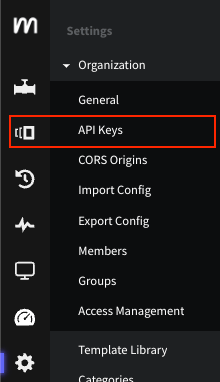
2. Go to **Settings >** **Organization > API Keys**.
3. To generate additional ingestion keys, click **Generate Ingestion Key** for up to a total of 10 keys.
4. To generate additional service accounts, click **Create Service Account** for up to a total of 50 keys.
5. Remove an ingestion key by clicking the X next to it.
Note that any applications actively using this key will no longer be able to send logs to your account
Key names must be 3 to 50 characters long and can contain only letters, numbers, underscores `_`, periods `.`, and hyphens `-`. You can't use spaces, accented or non-English letters, or other symbols or punctuation in a key name. If a name breaks these rules, you can't save it until you fix it.
 ### Ingestion Keys and Your Permissions
What you can do with ingestion keys depends on your organization permissions, which apply in cumulative levels. A view-level permission lets you see the ingestion keys. The next level also lets you generate ingestion keys with the **Generate Ingestion Key** control and rename an existing key by editing its name in the table. A higher level also lets you delete ingestion keys by clicking the X next to a key.
Controls you don't have permission to use appear disabled rather than hidden. Hover over a disabled control to see why it's unavailable.
The API Keys page opens for anyone with permission to view any of its key tables, so you may reach the page even without permission to view ingestion keys.
For how roles and permissions work, see [Role-Based Access Control](/docs/rbac). For the permissions each role grants, see the [Feature Access Matrix](/docs/feature-access-matrix).
## Manage Service Accounts and Keys
The keys table and its actions apply to your IAM Access Keys: personal access tokens, service accounts, and enterprise service accounts. Manage ingestion keys with the steps in [Access and Generate New Keys](#access-and-generate-new-keys) above.
After you create a key, it appears in a table with **Name**, **Access**, **Created**, and **Actions** columns. The **Name** column shows only a masked trailer of the secret, displayed as `····`, so the full key value never appears in the table. The **Access** column lists the key's assigned roles or permissions.
From the **Actions** column, the row actions available to you depend on the key type:
* **Rename** is available for all key types. For personal access tokens, availability to you also depends on your permissions. See [Personal Access Tokens and Your Permissions](#personal-access-tokens-and-your-permissions).
* **Edit permissions** is available for service accounts and enterprise service accounts, and only when role-based access management is enabled for your organization. It is not available for personal access tokens.
* **Rotate** is available for service accounts only. It is not available for enterprise service accounts or personal access tokens.
* **Delete** is available for all key types. For personal access tokens, availability to you also depends on your permissions. See [Personal Access Tokens and Your Permissions](#personal-access-tokens-and-your-permissions).
When you rotate a key, you confirm the action, then the current key stops working immediately and a new key is generated and shown to you once.
Rotating or deleting a key takes effect immediately and cannot be undone. Any integration or automation still using the old key stops working until you update it with the new key.
After you create or rotate a key, the full key value appears exactly once in a window with a copy control. It is not shown again, so copy and store it right away. This applies to all key types.
### Personal Access Tokens and Your Permissions
For your own personal access tokens, the actions available to you also depend on your own permissions, in three cumulative levels:
* View permission lets you view your own personal access tokens.
* The next level lets you **Create** and **Rename** tokens.
* A higher level lets you **Delete** tokens.
These levels govern what you can do with the tokens in the keys table, which is separate from the **Access** scope assigned to a token itself. They do not add **Rotate**, which is not available for personal access tokens at any level.
If you do not have view permission for your own personal access tokens, the keys table does not display them, and you are prompted to contact an account admin or owner to request access. With view permission, you see your tokens but not every control. If you are blocked from the **Create**, **Rename**, or **Delete** controls, contact an account admin or owner to request the permission you need. Deleting a personal access token requires a higher permission level than creating or renaming one.
These levels apply only to personal access tokens. The actions available for service accounts and enterprise service accounts are unchanged. Your organization's roles and permissions control what you can do. For more about organization roles and permissions, see [Role-Based Access Control](/docs/rbac) and the [Feature Access Matrix](/docs/feature-access-matrix).
The following table summarizes what each key type supports:
| Capability | Personal Access Tokens | Service Accounts | Enterprise Service Accounts |
| - | - | - | - |
| Create | Yes | Yes | Yes |
| Rename | Yes | Yes | Yes |
| Edit permissions | No | Yes | Yes |
| Rotate | No | Yes | No |
| Delete | Yes | Yes | Yes |
| One-time reveal | Yes | Yes | Yes |
For personal access tokens, whether **Create**, **Rename**, and **Delete** are available to you also depends on your permissions; see [Personal Access Tokens and Your Permissions](#personal-access-tokens-and-your-permissions) above.
For information on using IAM Access Keys to interact with the Mezmo platform APIs, see: [Authenticating With The API](/docs/api#authenticating-with-the-api)
### Ingestion Keys and Your Permissions
What you can do with ingestion keys depends on your organization permissions, which apply in cumulative levels. A view-level permission lets you see the ingestion keys. The next level also lets you generate ingestion keys with the **Generate Ingestion Key** control and rename an existing key by editing its name in the table. A higher level also lets you delete ingestion keys by clicking the X next to a key.
Controls you don't have permission to use appear disabled rather than hidden. Hover over a disabled control to see why it's unavailable.
The API Keys page opens for anyone with permission to view any of its key tables, so you may reach the page even without permission to view ingestion keys.
For how roles and permissions work, see [Role-Based Access Control](/docs/rbac). For the permissions each role grants, see the [Feature Access Matrix](/docs/feature-access-matrix).
## Manage Service Accounts and Keys
The keys table and its actions apply to your IAM Access Keys: personal access tokens, service accounts, and enterprise service accounts. Manage ingestion keys with the steps in [Access and Generate New Keys](#access-and-generate-new-keys) above.
After you create a key, it appears in a table with **Name**, **Access**, **Created**, and **Actions** columns. The **Name** column shows only a masked trailer of the secret, displayed as `····`, so the full key value never appears in the table. The **Access** column lists the key's assigned roles or permissions.
From the **Actions** column, the row actions available to you depend on the key type:
* **Rename** is available for all key types. For personal access tokens, availability to you also depends on your permissions. See [Personal Access Tokens and Your Permissions](#personal-access-tokens-and-your-permissions).
* **Edit permissions** is available for service accounts and enterprise service accounts, and only when role-based access management is enabled for your organization. It is not available for personal access tokens.
* **Rotate** is available for service accounts only. It is not available for enterprise service accounts or personal access tokens.
* **Delete** is available for all key types. For personal access tokens, availability to you also depends on your permissions. See [Personal Access Tokens and Your Permissions](#personal-access-tokens-and-your-permissions).
When you rotate a key, you confirm the action, then the current key stops working immediately and a new key is generated and shown to you once.
Rotating or deleting a key takes effect immediately and cannot be undone. Any integration or automation still using the old key stops working until you update it with the new key.
After you create or rotate a key, the full key value appears exactly once in a window with a copy control. It is not shown again, so copy and store it right away. This applies to all key types.
### Personal Access Tokens and Your Permissions
For your own personal access tokens, the actions available to you also depend on your own permissions, in three cumulative levels:
* View permission lets you view your own personal access tokens.
* The next level lets you **Create** and **Rename** tokens.
* A higher level lets you **Delete** tokens.
These levels govern what you can do with the tokens in the keys table, which is separate from the **Access** scope assigned to a token itself. They do not add **Rotate**, which is not available for personal access tokens at any level.
If you do not have view permission for your own personal access tokens, the keys table does not display them, and you are prompted to contact an account admin or owner to request access. With view permission, you see your tokens but not every control. If you are blocked from the **Create**, **Rename**, or **Delete** controls, contact an account admin or owner to request the permission you need. Deleting a personal access token requires a higher permission level than creating or renaming one.
These levels apply only to personal access tokens. The actions available for service accounts and enterprise service accounts are unchanged. Your organization's roles and permissions control what you can do. For more about organization roles and permissions, see [Role-Based Access Control](/docs/rbac) and the [Feature Access Matrix](/docs/feature-access-matrix).
The following table summarizes what each key type supports:
| Capability | Personal Access Tokens | Service Accounts | Enterprise Service Accounts |
| - | - | - | - |
| Create | Yes | Yes | Yes |
| Rename | Yes | Yes | Yes |
| Edit permissions | No | Yes | Yes |
| Rotate | No | Yes | No |
| Delete | Yes | Yes | Yes |
| One-time reveal | Yes | Yes | Yes |
For personal access tokens, whether **Create**, **Rename**, and **Delete** are available to you also depends on your permissions; see [Personal Access Tokens and Your Permissions](#personal-access-tokens-and-your-permissions) above.
For information on using IAM Access Keys to interact with the Mezmo platform APIs, see: [Authenticating With The API](/docs/api#authenticating-with-the-api)